
Nea · Tickets module
Ticketing system for businesses
Every customer request, with a number, a priority and an owner, inside the same virtual PBX you already use to talk to them.
A ticketing system turns every enquiry, incident or complaint into a ticket with a tracking number, a status and a person in charge. In Nea, Neotel’s AI virtual PBX↗ (opens in a new tab), tickets come in by email, from your website or from a call, and share data with the CRM and the calendar. Tickets module: +€5.90 per user per month (minimum 3 users), excl. VAT.
- Built in-house in Spain
- Data in Spain
- No extra software
- No lock-in
- ISO 9001 · GDPR

Ticket #1308New
I can’t transfer calls from the app
High priority · Came in by email · 4 min ago
01 · What it is
What is a ticketing system?
It is the software that organises your customers’ requests. Every email, call or form becomes a ticket with a number, a status, a priority and an owner, and the whole conversation stays in one place. It is also called a helpdesk, a service desk or incident management software. In the video, Nea explains it in 25 seconds (in Spanish).
Everything in one place
Calls, emails, forms and tickets in the same dashboard.
Nothing gets lost
Every request has a number, a status and a person in charge.
Context before you answer
When a customer calls, you already see their open tickets.
02 · Features
Everything Nea’s ticketing system does for you
A clear inbox for the whole team, with tickets grouped by owner and a search by number, subject, customer, email or phone.
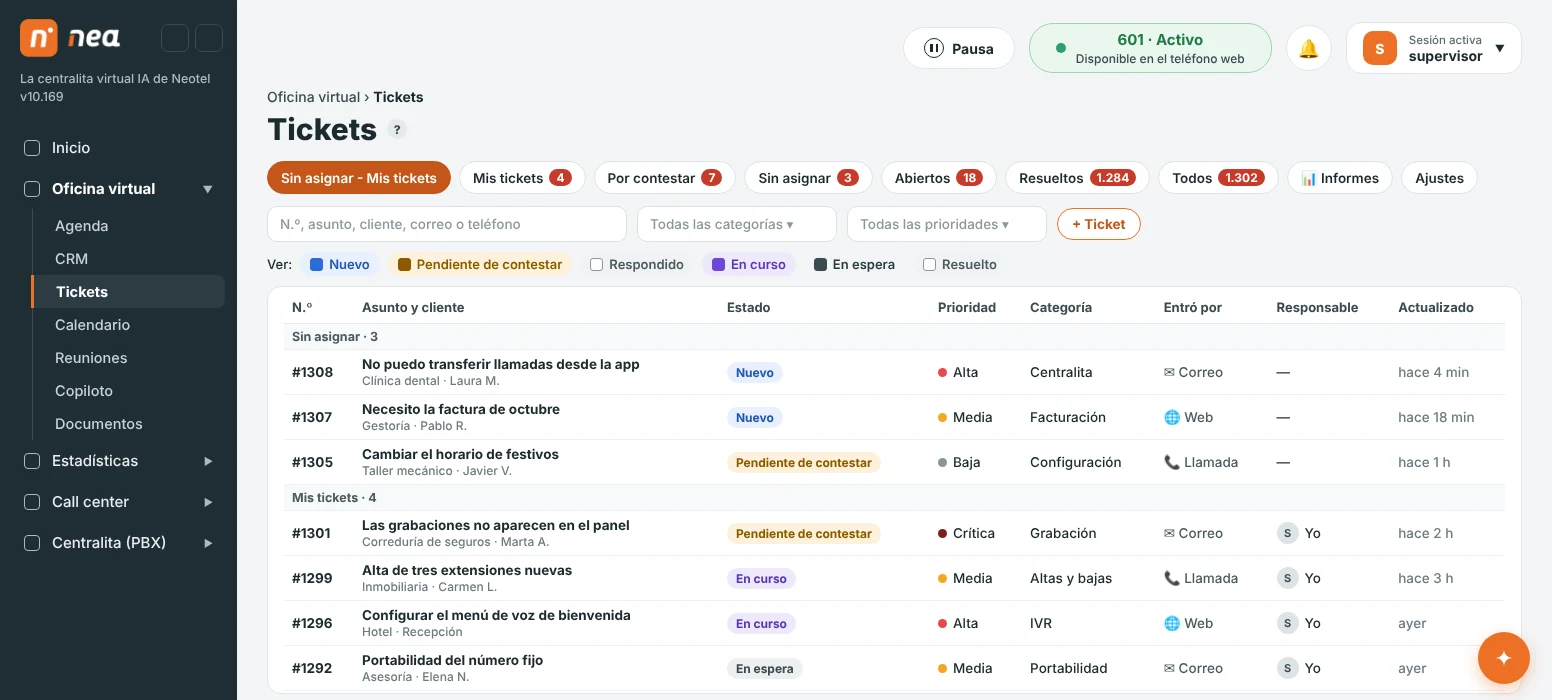
Inbox with counters
My tickets, To answer, Unassigned, Open and Resolved, each tab with its own count.
Statuses and priorities
Six statuses, from New to Resolved, four priorities and the categories you define.
The whole conversation
Customer messages, team replies and changes in order, with their attachments.
Internal notes
To coordinate with colleagues: the customer never sees them.
Assignment
Whoever answers an unassigned ticket takes it, or you pass it to a colleague.
Bulk actions
Change the status, priority or owner of several tickets at once, or merge duplicates into one.
Notifications
In the dashboard and by email when a ticket comes in, when the customer replies or when one is passed to you.
Excel reports
Tickets by day, month, person or category, and replies by person, ready to download.
03 · How tickets come in
Your customers write however they like, Nea keeps it in order
Tickets are created automatically from these channels, and also by hand with the “+ Ticket” button for what customers tell you in person:
- An email, a call or a form comes in
- Nea creates the ticket with its number
- The customer gets an acknowledgement
- Someone on the team takes it
- It is resolved and logged
By email
You connect your support mailbox and every new email opens a ticket. Customer replies go back to their ticket, and bounces and auto-replies do not count.
From your website
A form for your website, with spam protection and an acknowledgement with the ticket number.
From a call
When the call comes in, you see the caller’s open tickets and create a new one with one click. See the virtual PBX↗ (opens in a new tab)
04 · Your customer
Your customer, always informed
Every customer knows where their request stands, without having to call and ask:
Notifications
Emails with your branding
An email when their ticket is opened and when something important changes, with your logo, their name and the tracking number. You choose the wording and which changes trigger an email.
Tracking
A link to their ticket
With no username or password, the customer sees their ticket, replies, attaches files and marks it as resolved or reopens it.
Privacy
Internal stays internal
Internal notes never appear in emails or in the customer’s link, and every change is logged.
Do you also look after customers on WhatsApp? With the messaging module, WhatsApp, SMS and Telegram arrive in a shared inbox in the same dashboard. See WhatsApp Business↗ (opens in a new tab)
05 · With the PBX and the CRM
Tickets, calls and CRM with the same data
No extra software, no extra password and no copying data from one place to another:
Context when the phone rings
A card shows the caller’s open tickets before you answer.
Call from the ticket
The customer’s details with a button to call them, their record and their other tickets.
The CRM record
Tickets, calls and opportunities for the same customer in their record. See the AI CRM↗ (opens in a new tab)
Role-based permissions
Who works on tickets, who reassigns or deletes them, who sees the reports and who changes the settings.
06 · Built in or separate?
Tickets in your PBX or a separate helpdesk?
Many companies use ticketing software on one side and the PBX on the other. With Nea, it all comes together:
Inside Nea
- Tickets, calls, CRM and calendar in a single dashboard.
- One password and one provider.
- When a customer calls, you already see their tickets.
A separate helpdesk
- Another program, another password and another invoice.
- Copying customer data from one place to another.
- When you pick up, you don’t know what is pending.
Price
How much does the ticketing system cost?
Tickets is a Nea module: it adds to your plan, whether Nea Basic or Nea Advanced, and you pay per user, with a minimum of 3. Excl. VAT.
Tickets module
+€5.90per user per month, minimum 3 users
Inbox, statuses and priorities, branded emails to the customer, tracking link, notifications and reports.
CRM module
+€5per user per month, minimum 3 users
Each customer’s record with their tickets, calls and opportunities, and the sales pipeline.
Modules add to your Nea plan, Basic or Advanced, from €9.90 per user per month, with a minimum of 3 users. Example: 3 users on Nea Basic with Tickets, €47.40 a month. Excl. VAT and with no lock-in. Calculate your price on the plans and pricing page.
Frequently asked questions
Frequently asked questions about the ticketing system
What is a ticketing system?
It is software that turns every customer request (an enquiry, an incident or a complaint) into a ticket with a tracking number, a status, a priority and a person in charge. That way the team knows what is pending, who is handling it and what has been answered.
What is the difference between a ticketing system, a helpdesk and a service desk?
They are different names for the same thing: a tool to receive, organise and resolve customer requests. “Helpdesk” and “service desk” are used more in technical support. In Nea, the ticketing system is built into the PBX, alongside calls and the CRM.
How are tickets created in Nea?
Automatically, from the emails that reach your support mailbox, from a form on your website or from a call, with the “+ Ticket from this call” button. You can also create them by hand for what customers tell you in person or through another channel.
What statuses and priorities does a ticket have?
Six statuses: New, Awaiting reply, Answered, In progress, On hold and Resolved. Four priorities: critical, high, medium and low. You can also create the categories you need.
Can the customer track their ticket?
Yes. They receive an email with your branding and the tracking number when the ticket is opened and when something important changes, plus a link to view their ticket, reply, attach files and mark it as resolved, with no username or password.
Do I see a customer’s tickets when they call me?
Yes. When the call comes in, a card shows the caller’s open tickets, and you can create a new one from there. From each ticket you can also call the customer and open their CRM record.
What reports does the ticketing system have?
Tickets by day, month, person or category, and replies by person, for the period you choose. You can download the report and export the tickets to a file that opens in Excel.
How much does the ticketing system cost?
The Tickets module costs €5.90 per user per month, excl. VAT, with a minimum of 3 users, and adds to your Nea plan, Basic or Advanced. For example, 3 users on Nea Basic with Tickets pay €47.40 a month. There is no lock-in. Calculate your price on plans and pricing.

Shall we talk? We’ll show you Nea’s tickets in a demo
Tell us how you look after your customers today and we will show you Nea’s Tickets module in a demo, with no commitment.
 Request a Nea demo
Privacy Policy.BASIC INFORMATION ON DATA PROTECTION: Data Controller: NEOTEL 2000, S.L., Tax ID (NIF): B52009743, with registered address at C/ Fiscal Luis Portero García, nº 3, Portal 7, Oficina 1-1A, 29010 Málaga. Purpose of processing: To manage and process your contact request and inquiries regarding our services. Retention period: Personal data provided will be kept for as long as necessary to fulfill the purpose for which it was collected and to determine any potential legal liabilities arising from the processing. Rights of data subjects: You may exercise your rights of access, objection, rectification, erasure (cancellation), portability, and rights regarding automated decision-making, as well as revoke any consent previously granted, by directing your request to the Data Controller at the following email address: dpd@neotel2000.com. Further information can be found in our Privacy Policy.