

New · Nea CRM module
AI CRM built into your virtual PBX
Know who’s calling before you pick up.
The Nea CRM is the AI-powered customer management module of Neotel’s virtual PBX↗ (opens in a new tab). When the phone rings it shows the caller’s record, with their calls, WhatsApp messages, tickets and invoices on a timeline, and its AI copilot sums up in seconds what they have open and where you left off. It includes a sales pipeline, activities and statistics, and contacts from your website forms come in on their own. It adds €5 per user per month (excl. VAT) to any Nea plan.
- Inside your Nea virtual PBX
- In-house development
- Data on servers in Spain
- No lock-in contract
- ISO 9001 · GDPR
Read what Nea says (English translation)
“Marta is calling. Who was Marta again? Before you answer, Nea opens her record: her calls, her WhatsApp messages, her tickets and her invoices on a timeline. And it warns you: she has an unanswered ticket. You press Copilot and in seconds I tell you: what she has open, where you left off, and what to watch out for. You answer knowing everything. In sales, that’s half the sale. Call me and I’ll show you.”
The video is in Spanish, with subtitles.
01 · The AI copilot
The AI copilot tells you about the customer in seconds
During the call you press “Copilot” and Nea gathers everything about the calling company on a timeline, with its opportunities, invoices, tickets and other contacts, and sums it up for you. You answer knowing everything, and in sales that’s half the sale. The copilot only informs your team: it never sends anything to the customer.
What they have open
Ongoing opportunities, open tickets and pending tasks, in view before you answer.
Where you left off
A summary of the last conversation, by phone, WhatsApp or email, so you can pick it up without asking.
What matters
Alerts such as an unanswered ticket, so nothing catches you off guard.
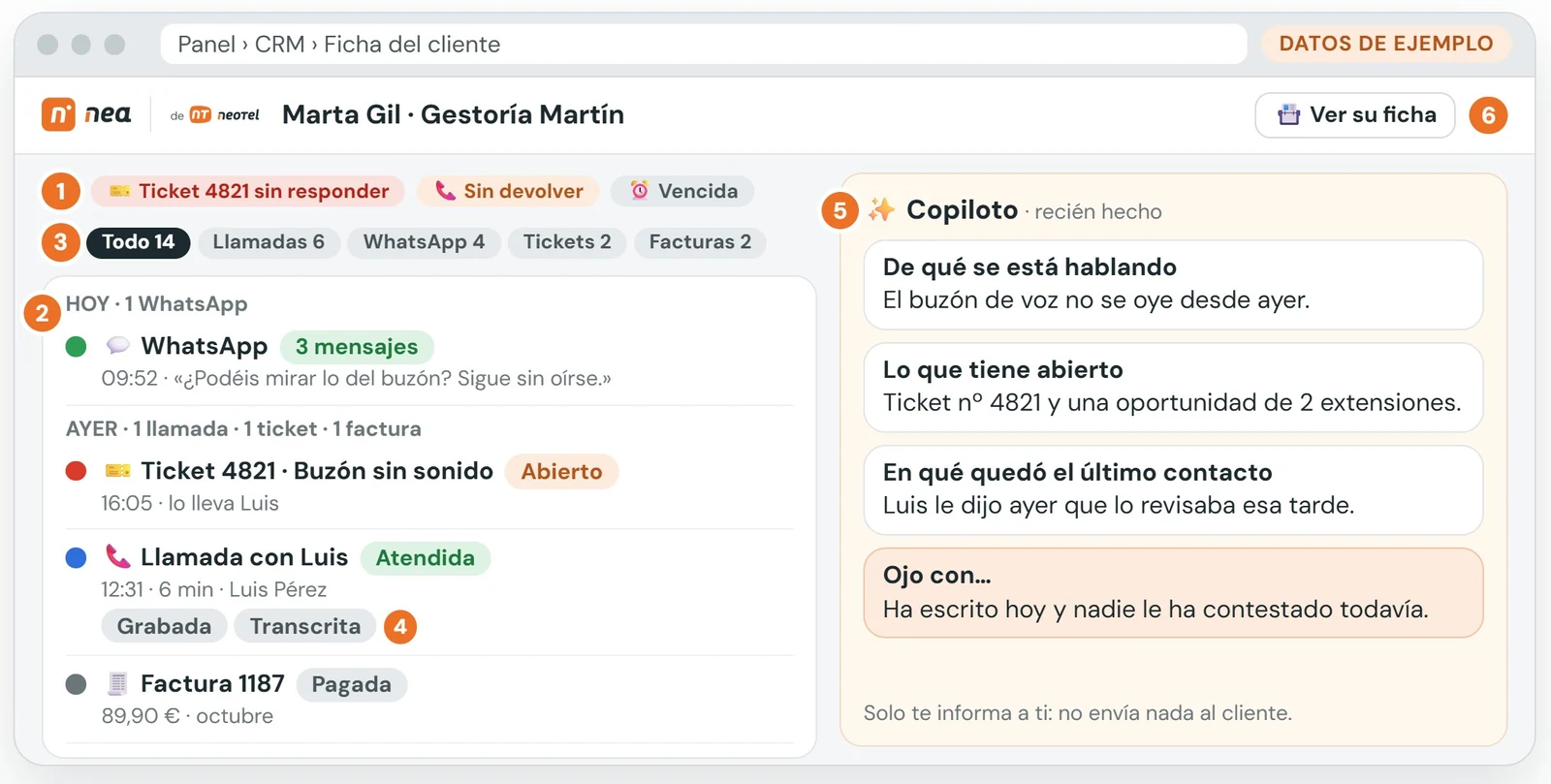
Customer record in the Nea CRM with the copilot · sample data
02 · Single record
The customer's whole history in a single record
Companies and people in one record with everything you have discussed, ordered on a timeline and summarised with AI. Find it by name, phone or email, and when a call comes in it opens on its own with their open opportunities and next tasks.
Calls
Every call, with its recording and transcript, linked to the contact's record.
Conversations from the company's official WhatsApp, alongside the rest of the history.
SMS and email
SMS and emails sent and received, without looking for them in another program.
Tickets
Customer requests and their status, so you know if anything is pending.
Surveys
What they answered at the end of each call or conversation.
Notes and voicemail
Your team's notes and the voice messages the customer left.
Opportunities and tasks
What they have open with your company and each sales rep's next task.
Call or message in one click
From the record or the opportunity you call, send an SMS or write on WhatsApp.
WhatsApp, SMS, tickets and surveys, depending on the modules you have. More about AI call transcription↗ (opens in a new tab) and WhatsApp Business in Nea↗ (opens in a new tab).
03 · Sales
Sales pipeline and activities so no follow-up slips through
Each opportunity moves through the sales pipeline with drag and drop. It stores what the customer wants, the product, the monthly amount, the priority, the expected close date, the source, the campaign, the sales rep and their tags, and changes of stage or sales rep are logged automatically.
- New
- Qualified
- Proposal
- Won
- Lost, with the reason
Activities with a date and an owner
Call, email, meeting, task or document. You see overdue, today's and upcoming activities, with a red counter for pending ones.
Your daily summary
When you log in to Nea you see new leads, won and lost deals and overdue activities.
Everything is logged
Changes of stage and sales rep are recorded automatically, without anyone having to note them down.
04 · Leads from your website
Contacts from your website come in on their own as opportunities
Connect your website forms to the CRM and every contact becomes an opportunity with a sales rep and a task, without copying anything by hand. No lead goes unanswered.
Step 1
The form comes in
Whoever fills in a form on your website enters the CRM as a new opportunity, with its source and campaign.
Step 2
Assigned in turn
The CRM assigns the opportunity to the next sales rep, so the work is shared out.
Step 3
Call today, with an alert
A “Call” activity is created for today and the sales rep gets an email alert.
Already have your customers somewhere else? Import contacts and companies from Excel or CSV, without duplicates. Connecting your ERP or the CRM you already use is a custom setup that we study case by case. To go further, discover AI process automation↗ (opens in a new tab).
05 · Who it’s for
A CRM for sales, call centers and customer service
The same CRM serves sales reps, agents and support teams, because everything goes through the PBX: calls, WhatsApp and tickets.
Sales teams
Each sales rep sees their own opportunities and activities, and the manager sees everything, with statistics per sales rep. See statistics↓
Call center
The record opens when the call comes in and the history stays linked to each contact. For campaigns, Nea Call Center adds the call launcher. See call center software↗ (opens in a new tab)
Customer service on WhatsApp
WhatsApp, calls and tickets in the same record, to reply with full context and without asking twice. See WhatsApp Business in Nea↗ (opens in a new tab)
SMEs
A CRM you don't have to integrate: it lives inside your PBX, you switch it on when you need it and pay per user. See plans and pricing→
06 · Statistics and privacy
Sales statistics and your data protected
Measure what each sales rep sells and where your best customers come from, with clear permissions and your data in Spain.
Sales statistics
- Conversion and amount won per sales rep, month by month.
- Reasons for lost deals, to see why a sale doesn’t close.
- Results by source, medium, product, province or tag.
- Everything downloadable as CSV.
- And each sales rep’s calls, in Nea’s call statistics (in Spanish)↗ (opens in a new tab).
Privacy and permissions
- Each sales rep sees their own data and the manager sees everything.
- Privacy and marketing consent checkboxes, with a record of who ticked them and when.
- CRM contacts are not uploaded to Google or Outlook.
- Opportunities lost as spam, unreachable or not interested have their contact details deleted after 30 days.
- Your PBX and your CRM, on Neotel servers in Spain.
Pricing
How much does Nea's AI CRM cost?
The CRM is a module that adds to your Nea plan, without changing software and with no lock-in on monthly billing. Prices exclude VAT.
CRM module with AI copilot
+€5per user per month
Customer record when the phone rings, AI copilot, sales pipeline, activities, website leads and statistics.
Nea plans
from €9.90per user per month
Nea Basic €9.90 and Nea Advanced €19.90 per user per month (minimum 3 users), or Nea Call Center from €19.90 per supervisor per month.
Example: 5 users on Nea Basic with the CRM cost 5 × (€9.90 + €5) = €74.50 a month, excl. VAT. Calculate yours and sign up online on the plans and pricing page.
What is an AI CRM?
It is customer management software that uses artificial intelligence to save you work: it summarises conversations, organises the history and alerts you to what matters. The Nea CRM also lives inside the virtual PBX, so every call, WhatsApp message or email lands in the customer record without copying anything by hand.
What does the Nea CRM copilot do?
During the call it gathers everything about the calling company on a timeline (opportunities, invoices, tickets and other contacts) and sums it up in seconds: what they have open, where you left off and what to keep in mind. It only informs your team; it never sends anything to the customer.
How much does the Nea CRM cost?
The CRM costs €5 per user per month, excl. VAT, and adds to your Nea plan (from €9.90 per user per month). For example, 5 users on Nea Basic with the CRM come to €74.50 a month. You can calculate your price and sign up on the plans and pricing page.
Do I need the Nea virtual PBX to use the CRM?
Yes. The CRM is a module of Nea, Neotel’s AI virtual PBX: that is why the record opens when the phone rings and every call is saved automatically. You switch it on in your own PBX when you need it, without changing software.
Does the CRM work for a call center?
Yes. The customer record opens when the call comes in and their history stays linked to each contact. For outbound call campaigns, Nea Call Center↗ (opens in a new tab) adds the call launcher with predictive and progressive dialers.
Can I import my contacts and connect my ERP?
You can import contacts and companies from Excel or CSV, without duplicates. Connecting your ERP or the CRM you already use is a custom setup: we study it case by case and tell you whether it is possible.
How do contacts from my website get into the CRM?
We connect your website forms to the CRM: each submission comes in as a new opportunity and is assigned in turn to your sales reps, a “Call” activity is created for today and the sales rep gets an email alert.
Where is the data stored and who can see it?
On Neotel’s servers in Spain. Each sales rep sees only their own opportunities and the manager sees everything, according to the permissions you set. CRM contacts are not uploaded to Google or Outlook, and the system records who ticked the privacy checkboxes and when.

Shall we talk? We'll show you the CRM with your own calls
Tell us how your team sells and serves customers and we’ll prepare a demo of the CRM with copilot, no strings attached.
 Request your AI CRM demo
Privacy Policy.BASIC INFORMATION ON DATA PROTECTION: Data Controller: NEOTEL 2000, S.L., Tax ID (NIF): B52009743, with registered address at C/ Fiscal Luis Portero García, nº 3, Portal 7, Oficina 1-1A, 29010 Málaga. Purpose of processing: To manage and process your contact request and inquiries regarding our services. Retention period: Personal data provided will be kept for as long as necessary to fulfill the purpose for which it was collected and to determine any potential legal liabilities arising from the processing. Rights of data subjects: You may exercise your rights of access, objection, rectification, erasure (cancellation), portability, and rights regarding automated decision-making, as well as revoke any consent previously granted, by directing your request to the Data Controller at the following email address: dpd@neotel2000.com. Further information can be found in our Privacy Policy.